
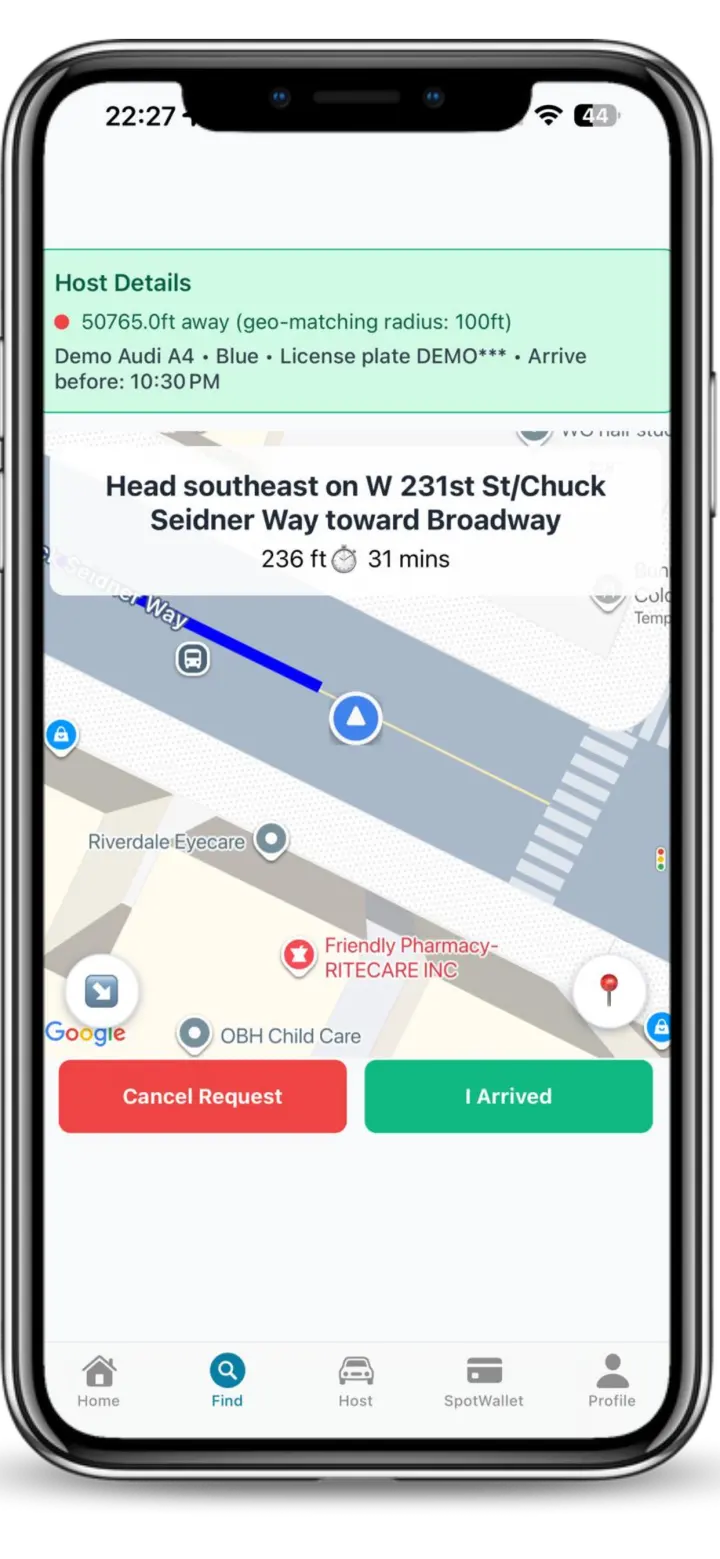
Find the Departure. Navigate to it. Know the curb before you park. Spotlink shows driver-reported Live Departures and can provide turn-by-turn guidance to the reported location. When you arrive, CurbAI helps you understand the restrictions before you leave the car.
Parking opportunities are not reserved or guaranteed. Availability, traffic, the reporting driver’s timing, and conditions at the location can change before you arrive.
Find: see drivers who are about to leave
A Live Departure is a timely signal from a driver who reports that a parking location may open soon. It is a reported parking opportunity—not ownership of a public space. Choose a Departure that fits your direction and timing without making an unsafe maneuver.
Navigate: get turn-by-turn guidance to the reported location
Select the Live Departure in Spotlink and follow turn-by-turn guidance toward its reported location. Normal GPS gets you to a destination. Spotlink can continue the parking search by guiding you toward a timely driver report near that destination.
Set up the search while safely and lawfully stopped. Do not handle the phone while driving; let a passenger interact when possible.
Check the curb with CurbAI
Reaching the reported location does not answer whether the space is legal for your vehicle right now. Use the 3D SpotMap for visual curb context, use CurbAI to organize the rule, and check every posted condition, including:
parking signs and active time windows
street-cleaning windows
temporary, vehicle-specific, loading, or access restrictions
Park and protect with TicketGuard
After parking where allowed, use TicketGuard when the current workflow supports the relevant rule window. TicketGuard can help with timing awareness, but it does not guarantee that a ticket will be avoided.
Save exactly where the car is parked
Use Spotlink’s saved parked-car location after parking so you can return to the correct place without relying on memory.
Share the saved location privately
Use Share My Spot to send the saved parked-car location to family or someone you trust. Private parked-location sharing is different from publishing a Live Departure signal.
Use multilingual Voice for supported parking questions
The multilingual Voice Assistant is a natural interaction layer across Spotlink. The currently verified example is “Can I park here?” Supported prompts can evolve, so follow the current examples shown inside the app. This page does not claim that Voice starts the navigation workflow.
Keep practical driver utilities in the same toolkit
Spotlink also provides separate map utilities for known public bathroom locations, parking meters, hydrants, and speed-camera awareness. These utilities support the broader trip; they do not guarantee parking availability or replace posted restrictions.
Learn how the community signal works
Read Find Parking Before It Opens for the timing behavior, How Sharing Your Departure Works for the reporting side, and the GPS parking guide for an educational explanation of the complete search.
Parking navigation FAQ
Does Spotlink provide turn-by-turn directions to parking?
Spotlink can provide turn-by-turn guidance to the location of a driver-reported parking Departure. The parking opportunity is not reserved or guaranteed because availability and conditions at the location can change before arrival.
What is GPS parking in Spotlink?
GPS parking in Spotlink combines device location, a live driver-reported Departure signal, turn-by-turn guidance toward the report, and curb context when the driver arrives.
Does selecting a Departure reserve the space?
No. Selecting a Departure starts guidance toward a reported opportunity. It does not create an exclusive claim or guarantee that the space will remain available.
What happens if the space is gone?
Continue the search safely. Do not stop illegally or make a sudden maneuver to reach a report that has changed.