
Can GPS help you find street parking in NYC?
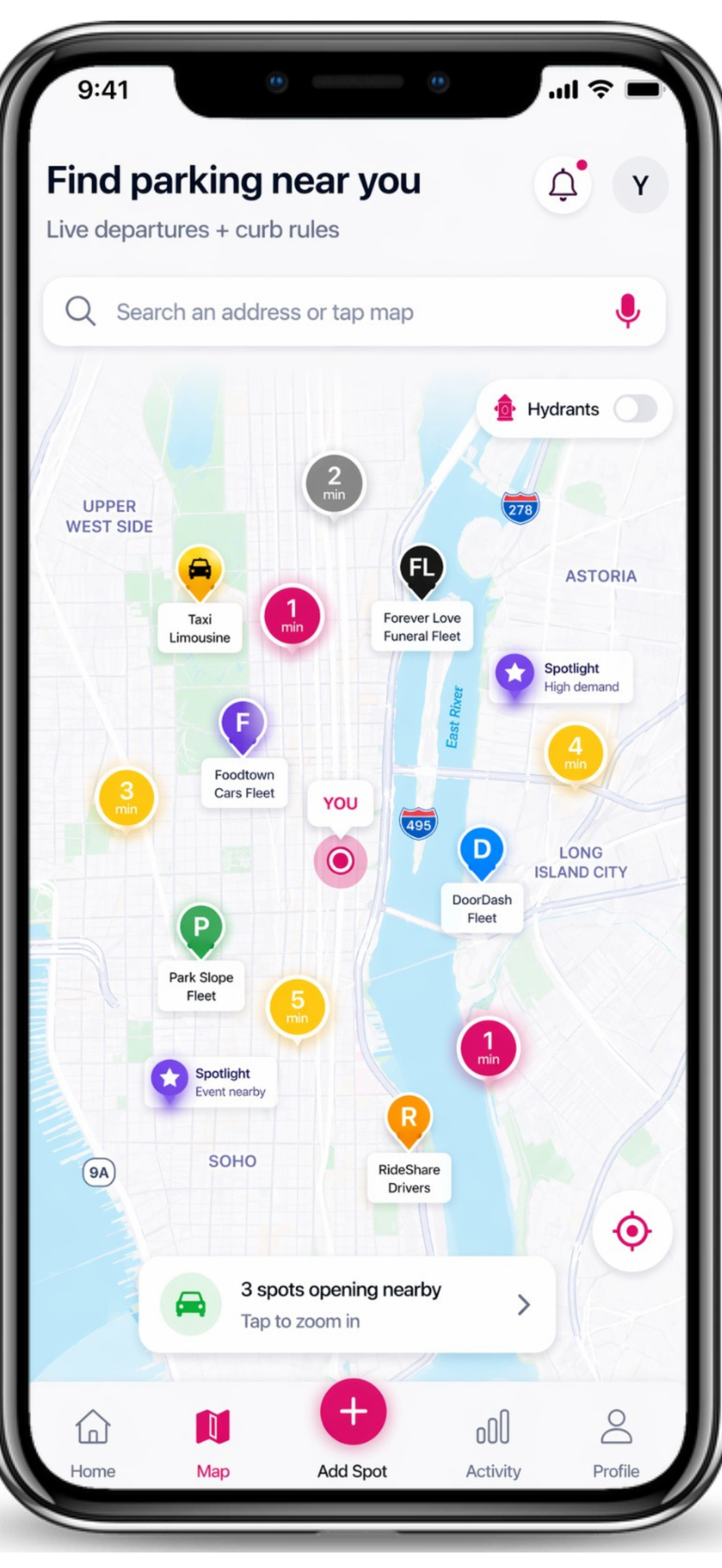
Yes, when the GPS workflow starts with a timely parking report. Spotlink can guide you toward a driver-reported Live Departure in NYC. Choose a report in the app, follow the turn-by-turn guidance to its reported location, and check whether the space is still open when you arrive. A Departure is a timely community signal. It is not a reservation, an exclusive claim, or a guarantee.
Why ordinary GPS does not finish the parking search
Navigation can bring a driver to a building, block, or destination. The difficult part often begins after arrival: circling nearby streets, watching for another driver to leave, and trying to understand the restrictions before committing to a space. Destination routing and street-parking availability are different problems.
That gap matters in NYC because a possible opening can disappear quickly. It also matters because an open space is not automatically a legal space. A sign, hydrant, loading rule, street-cleaning window, temporary notice, or vehicle-specific restriction can still control the decision.
How Spotlink Live Departures works
See a driver-reported signal. A nearby driver reports that they are preparing to leave a parking location.
Select the Departure. Choose a report that fits your direction and timing.
Follow turn-by-turn guidance. Spotlink guides you toward the reported location instead of leaving you to interpret a pin while moving.
Confirm what is actually there. When you arrive, verify that the space is still available and safe to approach.
Check the curb before parking. Use CurbAI, read every posted sign, and confirm the current restrictions before leaving the car.
The dedicated Spotlink parking navigation page explains this complete product flow. This article focuses on why the flow matters for a real NYC parking search.
A signal is useful because it is timely—not because it owns the space
Public street conditions change in seconds. Another vehicle may arrive first, the reporting driver’s timing may change, traffic may delay you, or the location may not work for your vehicle. Spotlink therefore treats a Live Departure as information that can improve the search, not as ownership of public curb space.
This boundary is important: Spotlink does not reserve a public space, grant an exclusive right to it, or promise that it will remain available. The driver must make the final decision based on current conditions.
Use CurbAI when you reach the report
The parking search does not end at navigation. Use CurbAI to understand the restrictions and curb context before parking. Guidance to the location and permission to park are separate questions.
Check hydrants and parking meters
Review hydrant distance and context before walking away. If payment applies, use the parking-meter map to find a nearby meter and then confirm the posted terms at the location.
Use TicketGuard after parking
TicketGuard helps with time-sensitive awareness after parking. Alerts can reduce risk, but they do not guarantee that a ticket will be avoided.
Save the car, then share the saved location privately
Use Save to remember where the car is parked. If someone you trust needs the location, use Share My Spot. Saving a parked car and reporting a Departure are different actions.
Use Voice for supported parking questions
The verified Spotlink Voice example is “Can I park here?” It provides a direct interaction path when a driver needs curb context without digging through menus. This article does not claim that Voice starts navigation. Use Voice only when safely and lawfully stopped, or let a passenger interact. Supported prompts can evolve, so follow the current examples shown inside the app.
Keep practical driver utilities close
A long parking search can create needs beyond the space itself. Spotlink can show known public bathroom locations and a separate speed-camera awareness map. These are practical map utilities, not parking-rule decisions or guarantees.
A safer GPS-parking routine
Set up the search before moving or while lawfully stopped.
Select a Live Departure that does not require an unsafe maneuver.
Follow turn-by-turn guidance without handling the phone while driving.
Expect the report to change; keep a backup route in mind.
Confirm availability, signs, hydrants, meters, temporary notices, and access when you arrive.
If the opening is gone or the curb is not legal, continue the search.
Sources and methodology
This guide describes the Spotlink product workflow reviewed on August 8, 2026. For controlling parking rules, use the signs and conditions at the location and consult the official NYC DOT parking-regulations page. Spotlink supplies guidance and context; it does not replace official postings or the driver’s responsibility.
FAQ
Does Spotlink reserve the Live Departure for me?
No. It is a driver-reported signal and navigation destination, not a reservation or exclusive claim.
Does turn-by-turn guidance guarantee the space will be open?
No. It guides you toward the reported location. Availability and street conditions can change before you arrive.
What should I do at the reported location?
Confirm the space is open, approach safely, read the posted restrictions, check nearby conditions, and use CurbAI for additional context before parking.
Does Spotlink replace my regular destination GPS?
No. Spotlink is not positioned as a replacement for general destination navigation. It provides a parking-specific workflow around driver-reported Departures and the curb decision.