
Share My Spot: How to Privately Share Where You Parked

Part of Spotlink’s Urban Mobility Intelligence system for NYC.

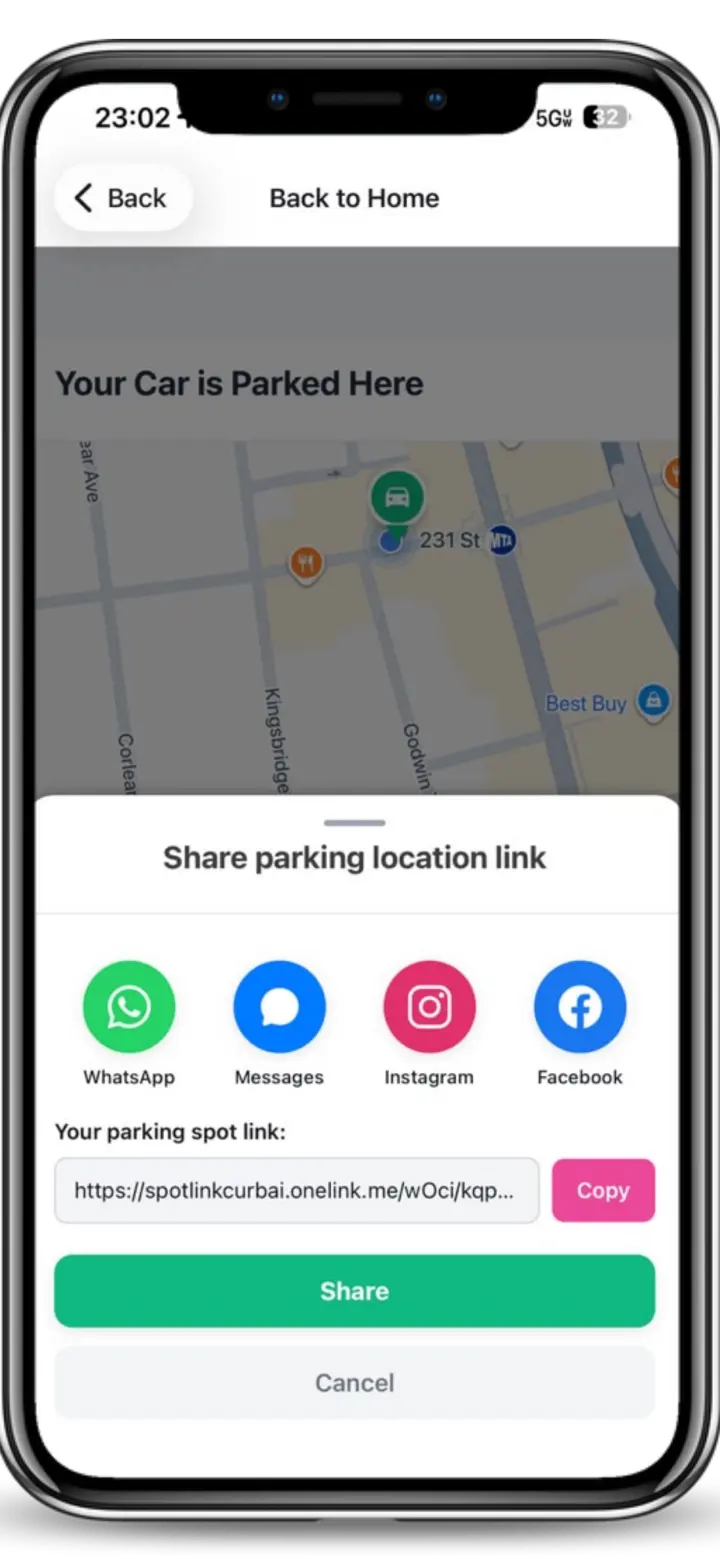
“Share my spot” means sharing the exact location where you parked with someone you trust — a family member, a friend, or anyone you choose.

Spotlink’s Share My Spot feature makes it easy to send your parked location so others can find the car without confusion, missed calls, or vague directions like “I’m near the corner.”

This feature is designed for clarity, safety, and coordination — not public sharing.

Quick Answer

Yes — you can share where you parked privately. With Spotlink, Share My Spot is a controlled, one-to-one (or one-to-few) share that sends a navigable location to someone you trust. It’s not a public broadcast and it doesn’t automatically share with other drivers.

Use Spotlink to reduce guesswork:
  • CurbAI™ helps interpret complex parking signs and curb rules so you don’t have to guess.
  • Ticket Guard™ helps alert drivers before time-based rules begin, reducing surprise tickets.
  • Real-world guides help you learn the patterns drivers miss most often.
Check Parking Smarter with Spotlink →

Why This Is Confusing for Drivers

Most people try to solve “share my parking spot” with texts, screenshots, or vague landmarks. In real life, that breaks fast — streets are busy, intersections look similar, and people interpret directions differently.

What drivers actually need is simple: one clear location that another person can follow without extra explanation.

What Does “Share My Spot” Mean in Spotlink?

In Spotlink, Share My Spot is a private, intentional action that lets you:

  • Share the precise location of your parked vehicle
  • Send it directly to a trusted person
  • Avoid confusion in busy streets, lots, or unfamiliar neighborhoods

This is especially useful when:

  • Someone is picking up the car
  • You’re meeting family or friends
  • You parked in a large or crowded area
  • You want someone to know exactly where the car is

There is no public broadcast and no automatic sharing.

Step-by-Step: How to Share Your Parked Location

Use this simple decision logic so the handoff stays clean:

Confirm the goal

If you want a trusted person to find your car, use Share My Spot (private). If you want to help nearby drivers because you’re leaving, that’s a different concept (departure sharing).

Park first, then share

Once you’re fully parked, open Spotlink and use Share My Spot. This avoids sending a half-accurate location while you’re still moving.

Send to the right person

Choose who receives the spot. Keep it limited to the people who actually need it.

Make it navigable

The point is that they can navigate directly to the location without back-and-forth messages.

Who Is Share My Spot For?

Share My Spot is built for everyday situations, including:

  • Families sharing a car
  • Partners coordinating pickups
  • Friends meeting in busy areas
  • Drivers lending a car temporarily
  • Anyone who has ever forgotten where they parked

Instead of texting landmarks or dropping pins manually, Spotlink lets you share your spot accurately in seconds.

How Sharing Your Parked Location Helps

Parking confusion often leads to delays, missed pickups, repeated calls, and stress in already busy environments.

Sharing your parked location removes that friction. When someone receives your shared spot, they can:

  • Navigate directly to the car
  • See the exact street location
  • Avoid guessing or circling

This turns parking from a guessing game into a simple handoff.

Is Sharing My Spot Safe?

Yes — Share My Spot is designed around control and consent:

  • You choose who receives the location
  • You decide when to share
  • The information is not public
  • There is no ongoing tracking unless you explicitly share again

Spotlink does not automatically share your parked location with other drivers or the public. Privacy and trust are core to how this feature works.

Share My Spot vs. Public Parking Sharing

It’s important to separate two different ideas:

Share My Spot (private)

  • Private, intentional
  • One-to-one or one-to-few
  • Trusted recipients
  • Focused on the location of your parked car

Departure sharing (helping nearby drivers)

  • Time-limited and anonymous
  • Designed to help traffic flow by signaling a spot may open
  • Not the same as sharing where your car is parked

Spotlink supports both — but they serve different purposes.

Common Mistakes

  • Sending a screenshot without an exact location
  • Using landmarks that aren’t unique (“near the deli”)
  • Sharing too early while you’re still moving
  • Assuming the other person knows the neighborhood
  • Over-sharing the location to people who don’t need it

How Spotlink Helps Beyond Sharing

Sharing your spot solves coordination. But city driving also includes parking rules, signs, and time-based restrictions that cause tickets.

If you want less guesswork while you park and after you park, Spotlink connects you to tools like CurbAI™ (for interpreting parking signs) and Ticket Guard™ (for alerts before time-based rules begin).

Final Thoughts

Sharing where you parked shouldn’t feel risky or complicated. Spotlink’s Share My Spot feature gives you a simple way to communicate clearly, privately, and accurately — using a location you already have.

It’s one less thing to worry about when navigating busy city streets.

FAQ

What is “Share My Spot” in Spotlink?

It’s a private feature that lets you send the exact location where you parked to someone you trust so they can find the car without confusion.

Is Share My Spot public?

No. It’s not a public broadcast. You choose who receives the location.

Does Spotlink track my location after I share?

Share My Spot is designed for control and consent. There is no ongoing sharing unless you explicitly share again.

What’s the difference between Share My Spot and departure sharing?

Share My Spot is private and focused on where your car is parked. Departure sharing is time-limited and intended to help nearby drivers know a spot may open.

Can Share My Spot help me avoid parking tickets too?

Sharing solves coordination, and Spotlink also includes features like CurbAI™ for sign interpretation and Ticket Guard™ for time-based alerts.

Learn More